Quick answer
Track. Compare. Improve. is a simple way to use swim data: track every official race in one place, compare each swim with the right context (same event, same pool type, the swimmer's own history and the relevant standard), and let the coach and swimmer use that picture to improve. Each step depends on the one before it. Gophin handles the first two for free.
When Rafaela started competing at ten, I did what any data-minded dad would do: I built a spreadsheet. Columns for meets, events, times, splits, notes. Within six months it was a mess: duplicate rows, missing meets, times scribbled on napkins that never made it in. One night I stared at it and thought, there has to be a better way to see if she is actually improving.
That frustration became Gophin. The framework that fixed it for our family, Track, Compare, Improve, is what this article is about.
The Clarity Gap in Swimming
Swimmers put in endless laps, coaches manage changing training blocks, and parents drive from meet to meet trying to decode the results. Yet a simple question is often hard to answer: is this swimmer really progressing?
Results are scattered across meet sites, PDFs and group chats. Splits live in one place, best times in another, last season on someone's laptop. Without one reliable record, people fall back on feelings instead of facts.
Clarity improves when everyone looks at the same record.
Track: Capture Every Official Swim
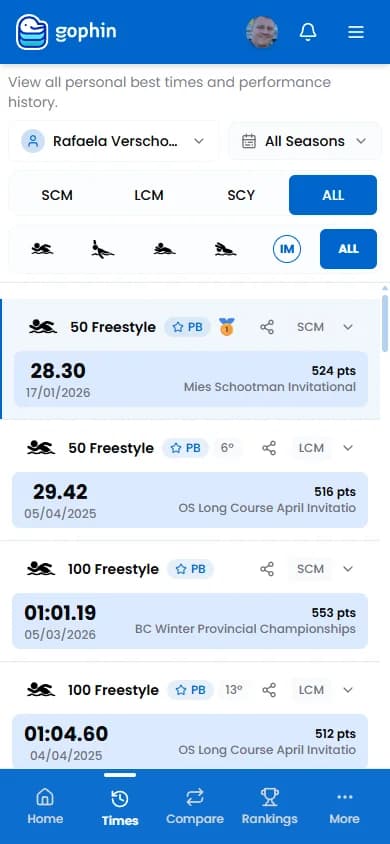
Tracking means having every race in one place, without depending on someone typing it in. Manual logs slip during travel meets and busy weekends. The record needs to fill itself from official results.
Once every swim is there, the history starts to talk. You can follow an event across seasons, compare unrested mid-season meets with championship swims, and see whether a best time was a one-off or part of a trend.
- No transcription errors. Times come from the official results, not from memory.
- Context over time. One swim sits inside the whole season.
- One story for the family. Parents and swimmers see the same numbers the coach sees.
In Gophin, that is Best Times (every event, each pool type, with the evolution chart) and Meets (every competition with placements and World Aquatics points).
Compare: Context, Not Just Numbers
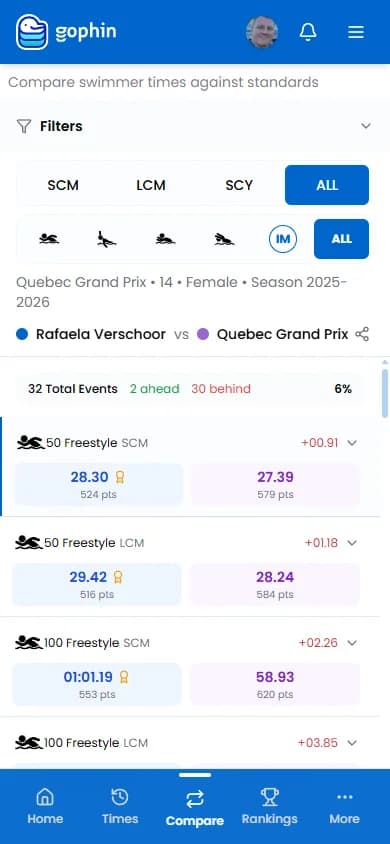
A raw time without context can mislead. Was it the fourth event of the day? Did the swimmer just age up? Is it faster than the same meet last year? Good comparisons answer those questions quickly:
- Against themselves. Same event, same pool type, this season against last. In Gophin: Compare → Seasons.
- Against the right standard. The gap to the next USA Swimming, Swimming Canada or provincial cut. In Gophin: Compare → Standards, with 60+ official standards from the US, Canada and Brazil. Our guide on swimming standards by age explains the levels.
- Against peers, carefully. Same age, same event, same pool type. In Gophin: Compare → Swimmers and the public Rankings.
Context also calms meet-day emotions. When a parent can see that a "slow" swim was within a few tenths of the swimmer's best at the same point last season, the conversation shifts from panic to patience.
Improve: Turn the Picture Into Decisions
Improvement becomes tangible when you can see change over time. A progression chart shows whether a technical change is sticking. Split analysis shows whether a swimmer tends to fade late in races or is simply going out too slowly (see why swimmers slow down in the second half). In Gophin, Times → Splits breaks each race into its official splits.
What happens next belongs to the coach and the swimmer. Data makes that conversation clearer; it does not replace it.
What Race Data Can Tell a Coach, and What It Cannot
Last season Rafa's coach walked me through how he uses meet data when planning training blocks. He had race splits and progression charts in one place and his own taper notes on the side. The race history answered some questions very well. The rest stayed in his notebook, where it belongs.
| Race data answers well | Stays with the coach |
|---|---|
| Is the swimmer faster than at the same point last season? | Which sets built that speed |
| Does the squad fade on the last 25 after a run of travel meets? | How to adjust recovery between those meets |
| Are the second halves of races getting stronger? | Technique and stroke corrections |
| How close is each swimmer to the next cut? | Which cut is the right goal for that athlete this year |
| Does the swimmer rebound between back-to-back meets? | Taper timing and training loads |
Two habits make that split work:
- Compare the athlete to themselves first. Instead of chasing a new best time every weekend, look at whether the back half is closing across meets. That is progress you can explain.
- Use the chart in the family conversation. "Back-half speed has held across three meets, so we are adding race-pace work" lands better than "they are doing fine."
That is the whole idea in one line: track official race times, compare the same event and pool type against the right standard, and leave improve to the coach and the swimmer in the water. Gophin does not plan workouts or store taper notes; it keeps the race record honest so the people doing the work can decide faster.
For coaches, the quickest start is to follow the roster: follow your swimmers in Gophin, then use Groups to split them by training group. Official results land after each meet's results are published. Free.
Who It Helps
Swimmers see how close their best times are to the next standard and notice small wins that the scoreboard hides.
Coaches get their whole squad's official results in one place, grouped the way they train, and can back up a training decision with the race history.
Parents understand the pace of progress without decoding timing printouts. For the basics of reading results, see our parent's guide to understanding swim meet results.
Start Simple
You do not need a big change to benefit. Start with one swimmer or one training group. Everything in Gophin is free, so there is nothing to unlock later: begin with Best Times, then add Compare → Standards and Compare → Seasons when the questions get sharper. Our getting started guide walks you through setup.
Swimming is built on discipline and repetition, but progress needs a clear record. Open your swimmer's Best Times in Gophin and see the whole story in one place. Free.