
Quick answer
A cut is an official time for a meet or a motivational level (B, BB, A, AA). Match the course, then compare. Sign in to Gophin (free), open Compare then Standards, pick the organization, and read the gap in seconds. You do not type times in.
The heat sheet says 1:02.19. Someone in the stands asks, "Did she make it?" Make what? B? AA? Sectionals? Juniors? Without the matching standard and the matching course, the number is just a number.
You can look it up in a PDF. Or you can sign in and let Gophin line every best time against the set you care about.
What "made the cut" actually means
Motivational cuts (B through AAAA in USA Swimming, B through AAA in Swimming Canada) mark a level. Championship cuts (Sectionals, Futures, Junior Nationals, Age Group Nationals) decide who can enter a named meet. Both live in Gophin. Our USA Swimming time standards guide explains the ladder.
Always match course. A 100 Free SCY does not prove an LCM cut. Convert only as an estimate, then wait for a swim in the right pool.
Check a cut in Gophin, step by step
- Sign in at gophin.app. Create a free account if you do not have one. No card.
- Find the swimmer under Times, Best Times. Search the legal name used in official records.
- Open Compare, then Standards. Pick the swimmer and one standards set (USA Swimming motivational, Junior Nationals, a provincial or LSC championship, Swimming Canada).
- Read the header. It counts how many events sit ahead of the cut and how many sit behind.
- Scan the rows. Each event shows the best time, the standard, and the gap in seconds. Green means the cut is already there.
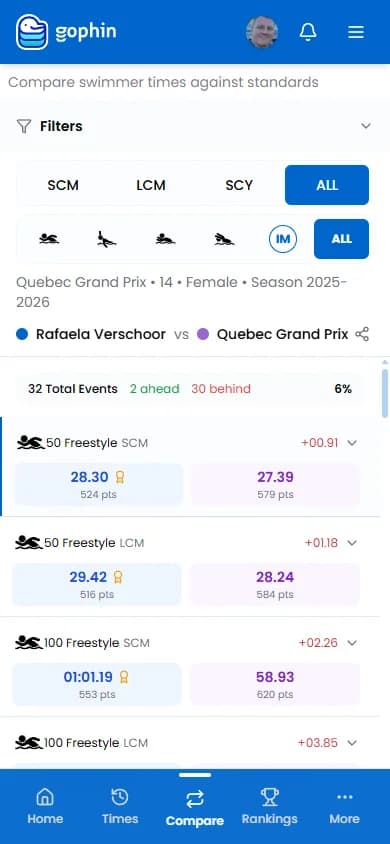
Need the longer walkthrough with every filter? Use the Compare Standards tutorial . For in-app help, see the Compare Standards wiki guide .
If the name does not appear
Try the name as it is printed on the heat sheet, not a nickname. If the swimmer has not raced a sanctioned meet yet, there is no official time to compare. After the first uploaded meet, the profile shows up on its own.
The Bottom Line
Made the cut means the official time, in that course, is at least as fast as the published standard. Sign in to Gophin, open Compare Standards, and stop flipping through PDFs on the pool deck.