
Quick answer
Sign in to Gophin (free), search the name on the official heat sheet, open Best Times. Sanctioned meet results appear on their own after the meet file is published. Add Favorites for siblings. No spreadsheet, no typing times.
Meet weekend ends. Someone asks for the 100 Back. You have a PDF in email, a screenshot in the family chat, and last season in a sheet you stopped updating in January. That is the job Gophin was built to kill.
Set it up once
- Create a free account at gophin.app. Google, Apple, or Facebook. No card.
- Go to Times, then Best Times. Search the legal name used in official records, not the nickname on the parka.
- Select the swimmer. Meet history and personal bests load from official competition records.
- Add them to Favorites so you are not searching again next Saturday.
- After the next sanctioned meet is published, open Home. Recent bests and recent meets update on their own.
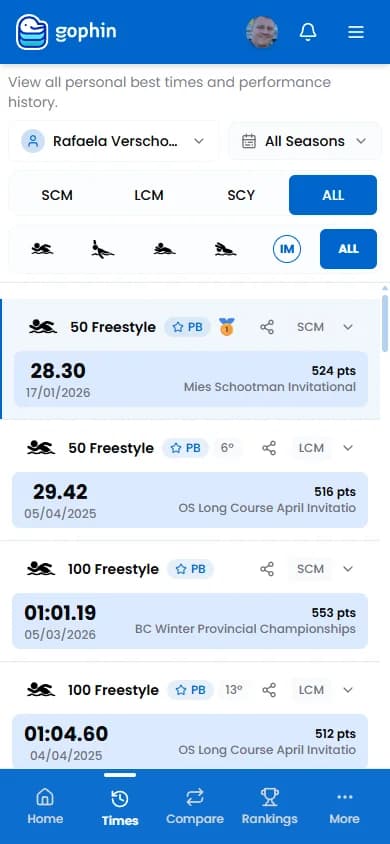
First-day screenshots are in Your First Day with Gophin . If you still have a spreadsheet habit, tracking progress without a spreadsheet covers why families drop the sheet.
What updates automatically
- New meet results, once the official file is up
- Personal bests, by event and course (SCY, SCM, LCM)
- Gaps to standards, if you open Compare Standards
- Rankings, if you open Rankings and set the event
Practice times do not appear. Gophin tracks competition records, not workouts. Unofficial dual meets may never land. That is a source limit, not a bug.
If you cannot find them
Try the heat-sheet spelling. Hyphens and middle names matter. Brand-new competitors have no profile until the first sanctioned result is published. After that, it shows up without you sending anything.
The Bottom Line
Following a child's times should be a Sunday-night glance, not a data-entry hobby. Sign in once, favorite the swimmer, and let official results fill Best Times and Meets.