Quick answer
Sign in to Gophin with Google, Apple, or Facebook (about ten seconds, no card). Search your swimmer by the official name. Best Times, Meets, and evolution charts fill in from official competition records. No manual entry.
When I showed the first version of Gophin to other swim parents at a meet, the first question was always the same: "How do I find my kid?" This guide answers that, and everything else you need for your first five minutes.
You signed up for Gophin. Nice move. Now what?
If you are staring at your screen wondering where to start, you are not alone. Every new user has the same question: "What do I do first?"
This Gophin app guide walks you through your entire first day. From creating your account to finding your swimmer and exploring your personal dashboard. In five minutes, you will know exactly how to use Gophin and where everything lives.
No swimming expertise required. No technical skills needed. Just follow along.
Step 1: Create Your Account
Getting into Gophin takes about ten seconds. Seriously.
Go to gophin.app/login and choose how you want to sign in. You have three options: Google, Apple, or Facebook. Pick whichever you already use. One tap and you are in.
No forms to fill out. No password to create and forget. No credit card. Gophin gives you instant access to all the core time-tracking features right away.
Quick tip for parents: Use whatever account you check most often. You will want to pop in after meet weekends to see your swimmer's latest results.
Step 2: Find Your Swimmer
This is where the magic starts. Once you are inside, head to Times > Best Times and tap the swimmer picker at the top of the screen. Search by name.
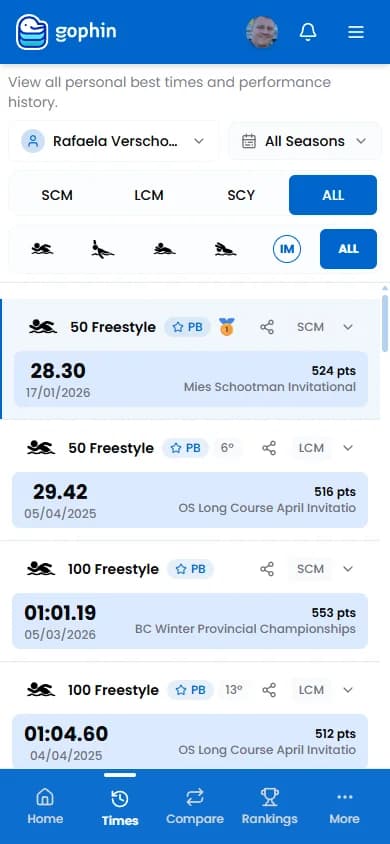
Type your swimmer's name and select them from the list. Gophin connects to official competition databases and pulls in their entire competition history automatically. Within seconds, you will see every meet, every event, and every time they have ever swum.
You do not need to enter anything manually. No typing in times from old meet sheets. No digging through emails. The system does the work for you.
What if you cannot find your swimmer? Make sure you are searching the name exactly as it appears in official competition records. Try the full legal name first. If your swimmer is brand new to competitive swimming and has not competed in a sanctioned meet yet, their data will appear automatically after their first competition is uploaded to official databases.
Step 3: Explore Your Dashboard
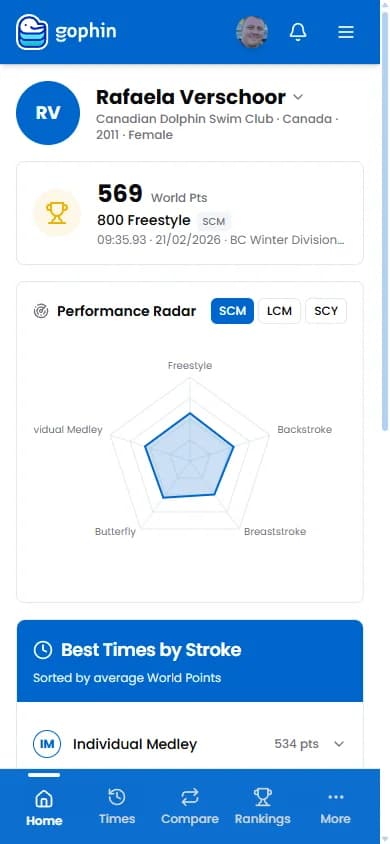
After selecting your swimmer, head back to Home. This is your personal dashboard, and it is designed to answer one question fast: "What happened recently?"
At the top, you will see a greeting and quick-access shortcuts to key features. Below that, three sections keep you up to speed at a glance:
Recent Best Times shows the latest personal bests across all events. You check after Saturday's meet. A new PB in the 100 Freestyle, right there on the dashboard. Each entry shows the event, the new time, and how much they improved.
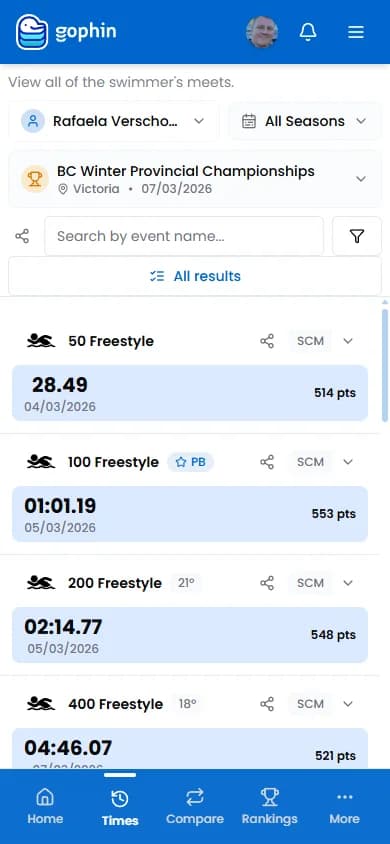
Recent Meets lists the most recent competitions with dates and locations. Tap any meet to see the full breakdown of how your swimmer performed.
Favorites gives you quick access to any swimmers you are following. This is especially useful for parents tracking siblings or coaches monitoring a group.
Think of the dashboard as your morning check-in. Open Gophin, glance at the dashboard, and you instantly know what is new.
Step 4: View Your Best Times
Ready to see the full picture? Tap Times in the bottom navigation, then select Best Times. This is the heart of Gophin.
Here you will find every personal best organized by event. Each row shows the event name, best time, and when it was set. You can filter by:
- Pool length, 25m (short course) or 50m (long course)
- Stroke, Freestyle, Backstroke, Breaststroke, Butterfly, or IM
- Season, Current season or all time
Tap any event row to expand it and see the full time progression. You will see a chart showing how the time has changed over multiple meets. That visual line going down? That is improvement happening in real time.
For parents who are new to competitive swimming, this page answers the question "How is my kid doing?" in the clearest way possible. No jargon. Just times, events, and a line that shows progress. If you want to understand what those times mean in context, our guide on swimming standards by age explains every level.
Step 5: Navigate the App
Gophin has more to explore beyond Best Times. Here is a quick map of the main sections so you know what lives where.
Times, Your home base for viewing swimming data:
- Best Times, All personal bests by event
- Meets, Full history of every competition
- Standards, Browse official qualification standards from organizations across Canada and the USA
- Records, World records by event for reference and inspiration
Compare, side-by-side analysis tools, free for everyone (see our step-by-step tutorial):
- Compare Swimmers, Head-to-head with any other swimmer
- Compare Standards, See how close you are to qualifying times
- Compare Seasons, Track improvement from one season to the next
Rankings, See where your swimmer ranks nationally, regionally, by club, or at specific meets.
Management, Organize your experience:
- Favorites, Follow swimmers you care about
- Groups, Organize favorites into custom groups
Times, Compare, Rankings, Splits, and Management are free for everyone. Sign in and use them. No card needed.
What's Next?
You have your account. Your swimmer is loaded. Your dashboard is showing real data. Here are a few things to try during your first week:
Free features to explore now:
- Add swimmers to your Favorites list
- Create a Group for your family, training squad, or carpool crew
- Browse Standards to see official qualifying times
- Check Meets to look back at past competitions
- Expand events on the Best Times page to see time progression charts
When you are ready for more: The Compare tools are included for everyone. These let you see how your swimmer stacks up against any other swimmer, track progress toward specific qualification standards, and compare performances across seasons.
For a deeper dive on tracking, check out our guide on how to track swimming times automatically.
You're Set Up
That is it. Your swimmer's full competition history is right here in Gophin. Every meet. Every event. Every personal best. All synced automatically from official databases.
No spreadsheets. No digging through results websites. No manual entry. Just open the app and see what is new.
The best part? From now on, every new meet result appears automatically. Swim at a competition, and the times show up in Gophin after the official file is published.
Welcome to smarter swimming.