Quick answer
To track competitive swim times, capture every race result with stroke, distance, time, and pool length, then organize by event so you can spot trends and compare against standards. The fastest method uses an app that imports official meet results automatically. Manual spreadsheets work, but most families stop updating them partway through the season.
My first approach to tracking Rafa's times was a Google Sheet. It lasted exactly three meets before becoming completely unmanageable, wrong columns, missing events, times I forgot to enter. There had to be a better way.
If you have ever wondered how to track competitive swim times without losing your mind, you are not alone. Competitive swimmers race dozens of events across multiple meets every season. That creates a mountain of data, times, placements, personal bests, pool lengths, strokes, scattered across websites, emails, and half-finished spreadsheets.
This guide walks you through every tracking method available today, from pen-and-paper logs to apps that sync your results automatically. By the end, you will know exactly how to organize swim times, spot trends, and track progress without a spreadsheet.
Plain-English Definitions
Tracking swim times means capturing every race result, stroke, distance, time, pool length, and meet name, then organizing the data so progress becomes visible over weeks, months, and seasons. It is the difference between knowing a swimmer has improved and being able to prove it.
Competitive swim tracking adds two layers on top of that: comparison against age-group qualifying standards (B, BB, A, AA), and trend visualization across multiple seasons. Without those layers, a list of times is just numbers without context.
Why Tracking Competitive Swim Times Matters
Tracking turns scattered competition records into a clear story of improvement. Without it, swimmers cannot set specific qualifying targets, coaches lose visibility on event-by-event progress, and parents fall back on memory after each meet.
Set Realistic Goals
You cannot aim for a qualifying standard if you do not know your current best time in that event. Tracking gives you a clear starting point. From there, you can set specific, measurable targets: "Drop 1.5 seconds in the 100 Backstroke by March."
Organizations like Swimming Canada and USA Swimming publish qualification standards for provincial, state, and national championships. Knowing your gap to those standards turns vague ambition into a concrete plan. For a detailed breakdown of how these levels work, see our guide on swimming standards by age.
Spot Patterns Over Time
One meet result is a snapshot. A full season of tracked times is a story. When you track consistently, you start to see patterns:
- Which strokes improve fastest
- Whether short course or long course times drop more
- How rest and taper affect performance
- Which meets produce the best results
These patterns help swimmers and coaches make smarter training decisions.
Stay Motivated
Swimming is a sport of small margins. A 0.3-second improvement might not feel dramatic in the moment, but when you look back at a full season of gradual drops, the progress is undeniable. Visual proof of improvement keeps swimmers motivated through tough training blocks.
Communicate with Coaches
Coaches who have access to complete, organized data can make better decisions about event entries, relay selections, and training focus. Tracked times remove guesswork from the conversation.
For parents, tracking times answers the question you ask after every meet: "How did it go?" Instead of a shrug, you get real data.
Traditional Methods and Their Limits
Traditional swim tracking falls into four categories: paper logs, spreadsheets, meet result PDFs, and club website lookups. Each works at casual volume but breaks down once a swimmer races a full competitive season. The shared weakness is constant manual effort, which is exactly what fails first when a competitive schedule picks up pace.
Paper Logs and Notebooks
The simplest method. After each meet, write down the event, time, date, and meet name.
Pros: No technology needed. Easy to start.
Cons: No calculations, charts, or trend analysis. Notebooks get lost, damaged, or forgotten at home. Finding a specific time from six months ago means flipping through pages. Cannot filter by pool length (short course vs. long course) or stroke.
Paper logs work fine for a casual swimmer racing a few meets a year. For a competitive swimmer racing many meets and events every season, they break down fast.
Spreadsheets
The most common upgrade from paper. Parents create a Google Sheet or Excel file with columns for date, event, time, meet, and pool type.
Pros: Sortable and searchable. Can add formulas for improvement tracking. Shareable with coaches.
Cons: Requires manual entry after every meet. One typo (58.45 entered as 58.54) skews your data. No built-in standards comparison. Formatting gets messy as data grows. Most families abandon them mid-season when life gets busy.
Spreadsheets are powerful in theory. In practice, they demand discipline that few families can sustain meet after meet.
Meet Result PDFs and Websites
After each competition, meet organizers publish results online or as downloadable PDFs. Some swimmers rely on these as their primary record.
Pros: Accurate (official results). Include placements and sometimes splits.
Cons: Results are scattered across dozens of different websites. Links break or pages get taken down after the season. No consolidated view of your best times across all meets. Searching for a single time means opening multiple documents. No trend tracking or progress visualization.
This approach stores data, but it does not organize or analyze it. You end up with a bookmark folder full of dead links.
Club Websites
Some swim clubs post their members' results on a team website or use club management software.
Pros: Updated by the club, not by you. Sometimes includes rankings within the club.
Cons: Limited to results from that club's meets. Does not capture results from invitational or out-of-region meets. Data access ends if you switch clubs. Rarely includes standards comparison or personal analytics.
Club websites are helpful supplements but not a complete tracking solution.
Quick Decision Guide: Which Method for Which Swimmer?
Match the method to the swimmer's racing volume and the family's tolerance for manual work:
- Pen and paper logs: a few meets a year, casual swimmer, no need for trend analysis.
- Spreadsheet: a regular meet schedule and a parent or coach willing to enter data every Monday. Works until life gets busy.
- Meet result PDFs: Backup reference only. Not a complete system.
- Club website: Works while staying with one club. Data does not travel when families switch teams.
- Auto-sync app: a full competitive season, multi-event swimmer, parent or coach who wants zero manual entry.
The break point is usually around the third or fourth meet of a competitive season, when the cumulative manual entry workload starts losing to family schedules.
What Modern Swim Tracking Looks Like
Modern swim trackers automate the work that traditional methods leave to humans. They sync race results from official competition databases, organize personal bests by event automatically, plot time evolution over months and years, and reference qualifying standards in one place. The result: no manual data entry for any meet that reaches official records.
Here is what to look for in a tracking tool built for competitive swimmers:
Auto-Sync from Official Competition Records
The biggest upgrade over manual methods. Modern trackers pull results directly from official competition databases. You swim a meet, the results get uploaded to official records, and your tracker syncs them automatically. No manual entry and no typos. (Practice times and some unofficial meets never reach official records, so a good tracker also lets you add those by hand.)
All Personal Bests in One Place
Instead of digging through PDFs and spreadsheets, you see every personal best organized by event. Filter by pool (25m, 50m or 25 yards) and stroke to find exactly what you need in seconds.
Complete Meet History
Every meet you have ever competed in, with every event and time, organized chronologically. Open a meet to see what you swam, your times, and which ones were personal bests.
Time Evolution Charts
A visual graph showing how your time in a specific event has changed over months and years. This is the feature that makes progress tangible. You can literally watch the line climb as your times get faster: on the chart, a rising line means faster.
Mobile Access
Your data travels with you. Check your times at the pool, on the way to a meet, or at the dinner table when someone asks "What's your 100 Free time?" Pull it up on your phone in two taps.
Standards Reference
Look up official qualifying standards from organizations like Swimming Canada, USA Swimming, and provincial/state bodies. Know what time you need to hit for Provincials, Nationals, or any other championship, all in one place.
How to Track Times with Gophin (Step-by-Step)
To track competitive swim times with Gophin, create a free account, search your swimmer by name, and select Follow. Every personal best and meet result loads from official competition records. Setup takes a couple of minutes. No manual entry.
Gophin is a free app for competitive swimmers, parents and coaches, with official results from the US and Canada and official time standards from the US, Canada and Brazil. It works in the browser and in the iOS and Android apps.
Step 1: Create Your Account
Go to gophin.app and sign up with Google or email. Gophin asks one question ("First, who are you?": swimmer, parent, coach or something else) so it can point you to the right screens.
Step 2: Find Your Swimmer
On the search screen, type at least three letters of the name as it appears on official results. Optional filters (gender, birth year, country, club) help with common names. Select Follow on the right swimmer. Parents search for their child; coaches can add every swimmer on the team. If you cannot find someone, Help me find my swimmer sends us the details.
Step 3: View Best Times
Times → Best Times shows every personal best, organized by event. Each card shows the time, a PB badge, the World Aquatics points and the meet where it was swum.
You can narrow it down with:
- Pool: SCM, LCM, SCY or All
- Stroke: Freestyle, Backstroke, Breaststroke, Butterfly, Medley
- Filters: the swimmer, the season (or All Seasons), and whether to include your own custom times
- As Swam / SCM / LCM: see times exactly as swum, or every time converted to one pool (converted times are marked)
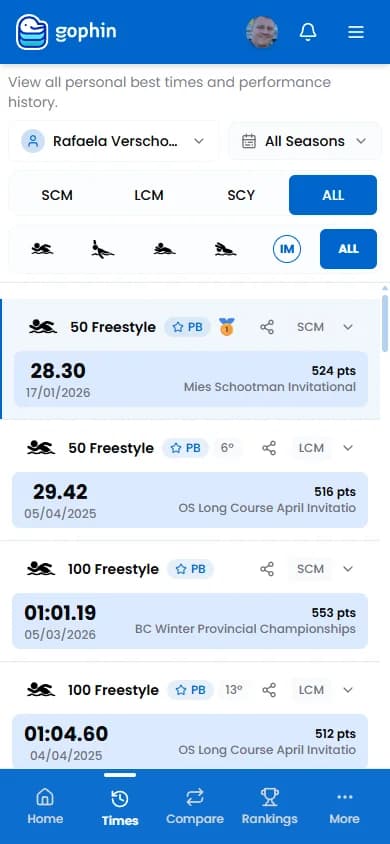
Best Times page: every personal best in one place
This single screen replaces the spreadsheet, the notebook and the PDF folder.
Step 4: Check Every Meet
Times → Meets lists every competition. Pick a meet to see each event swum, the time, the place, PB badges and World Aquatics points. All Results at the bottom opens the full results of that meet, every swimmer and every heat.
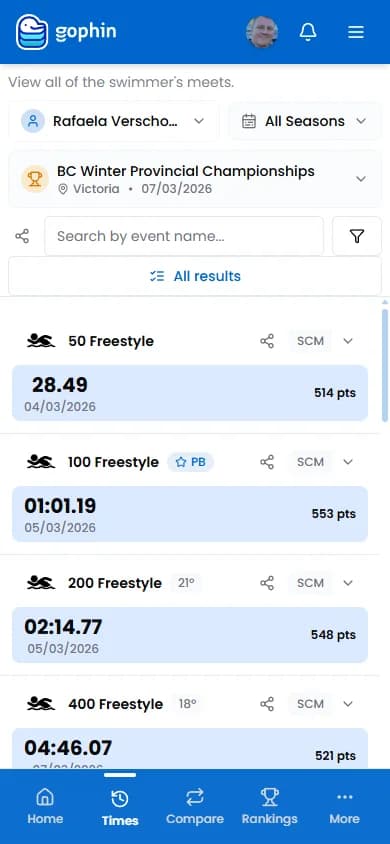
Meets: the complete history of every competition
This is especially useful for parents after a meet weekend. If you are new to reading results, our parent's guide to understanding swim meet results explains every column and abbreviation.
Step 5: Track Time Evolution
On Best Times, select an event to open it, then choose Chart (every time in that event plotted over months and years), Splits (the splits of that swim, when the meet recorded them) or History (every swim in that event, in a list).
The chart makes progress visible. Even when improvement feels slow, the trend tells the real story. Share it with your swimmer after a tough training week. It works better than a pep talk.
Step 6: Compare and Rank
- Compare → Standards: the gap to B, AA, provincial or national cuts, event by event. See the standards comparison tutorial.
- Compare → Seasons: this season against last season. See the Compare → Seasons tutorial.
- Compare → Swimmers and Compare Groups: swimmers side by side.
- Times → Splits: splits, comparison with your best time, pace and where to find time. See how to read swim splits.
- Rankings: where the swimmer sits by age, region and country.
- Times → Standards and Times → Records: browse the official cuts and records (world, Olympic, national and more).
All of it is free for everyone. There is no paid plan.
Tips for Consistent Tracking
Five habits separate swimmers who track consistently from those who lose the thread mid-season: review times after every meet, distinguish short course from long course pools, focus on multi-month trends rather than single races, share data with the coach, and use one app for everyone in the family.
Review After Every Meet
Make it a routine. The Monday after a meet, open your tracker and look at the new results. Did you set any PBs? How did your times compare to your previous bests? Which events improved and which stayed flat? This quick review takes two minutes and keeps you engaged with your progress.
Know Your Pool Types
Swimming times vary by pool length. A 1:05.00 in a 25m pool (short course metres) is not the same as a 1:05.00 in a 50m pool (long course metres). Always note the pool type when comparing times. Good trackers let you filter by pool length so you are comparing apples to apples.
For swimmers in the United States, short course yards (SCY) is the most common format. Canadian swimmers primarily race in SCM and LCM. Knowing the difference matters when setting goals and comparing results.
Focus on Trends, Not Single Times
One bad meet does not mean you are getting slower. One great meet does not mean you are ready for Nationals. Look at the trend line across an entire season. Time evolution charts are your best friend here.
Share Data with Your Coach
Give your coach access to your tracked times, or pull up your data during conversations about training and meet strategy. A coach who can see that your 200 IM has dropped 4 seconds this season but your 100 Fly has plateaued will adjust training accordingly.
Track More Than One Swimmer
If you are a parent with multiple kids in competitive swimming, track all of them in one account. If you are a coach, add your team members to your favorites so you can switch between swimmers quickly.
The Bottom Line
Tracking swim times does not need to be a chore, and it does not need a spreadsheet or a folder of meet PDFs.
Modern tools auto-sync your results from official competition records, organize every personal best in one place, and show your progress with clear evolution charts. You get complete data without doing any data entry.
Whether you are a swimmer who wants to see all your PBs at a glance, a parent who wants to finally understand meet results, or a coach who needs quick access to any swimmer's history, the right tracker saves hours of work and gives you better insights.
Gophin is free to use. Sign in and see your times.
Sign in and open your swimmer's Best Times
Related guides in this series
- Season best vs personal best, what counts
- Compare swim seasons to see real progress
- The plateau is normal, keeping your swimmer motivated
- Turning swim data into clarity
- Track your child's swim progress without a spreadsheet
- How to find lost swim meet results
- Swim rankings: what your swimmer's rank really means